Have you ever noticed that your mobile phone speaker is not producing clear sound? Is your phone’s audio becoming low, muffled, or difficult to hear during calls, music, and videos? If yes, you may be looking for an easy way to clean your mobile speaker and improve its sound quality.
Sometimes, dust, dirt, moisture, or small particles can affect the performance of your smartphone speaker. In such situations, a Mobile Speaker Cleaner Sounds App can be a helpful tool to try.
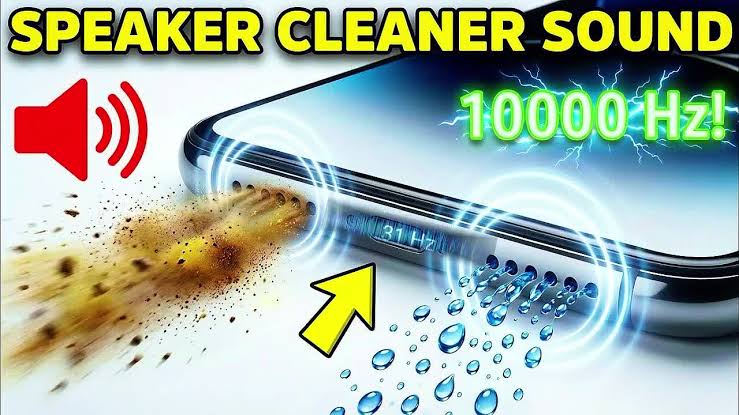
A speaker cleaner app uses different sound frequencies to create vibrations through your phone’s speaker. These vibrations may help loosen small particles or moisture that are affecting the sound. The app provides a simple way to test your speaker and try to improve its audio performance without opening your mobile phone.
In this article, you will learn what a mobile speaker cleaner sounds app is, how it works, how to use it, its benefits, and whether it can really clean your phone speaker.
Let’s explore everything step by step.
What Is a Mobile Speaker Cleaner Sounds App?
A Mobile Speaker Cleaner Sounds App is a smartphone application designed to help users improve speaker performance by playing specific sound frequencies.
These applications are commonly used when a phone speaker sounds muffled, produces low volume, or has been exposed to a small amount of moisture.
Instead of using physical cleaning tools, the app generates sound waves that create vibrations inside the speaker.
These vibrations may help move loose dust or moisture away from the speaker’s surface or openings.
Most speaker cleaner applications provide different cleaning modes, including automatic cleaning, manual frequency adjustment, and sound testing.
The main purpose of these apps is to provide a simple software-based method for trying to improve the sound coming from your mobile speaker.
However, it is important to understand that a speaker cleaner app cannot repair damaged hardware or remove deeply trapped dirt.
Why Does Your Mobile Speaker Sound Low or Muffled?
Before using a speaker cleaner app, it is important to understand why your phone speaker may not be producing clear sound.
There are several common reasons.
1. Dust and Dirt Inside the Speaker
Dust is one of the most common reasons for reduced speaker performance.
When you use your smartphone regularly, small particles can collect around the speaker grille.
Over time, this dust may block some of the openings and affect the sound coming from your device.
A speaker cleaner sound may help loosen some loose particles, but it cannot guarantee that all dust will be removed.
2. Moisture Inside the Speaker
If your mobile phone gets wet or is exposed to a humid environment, moisture may temporarily affect its speaker.
You may notice that the sound becomes unclear, distorted, or quieter than usual.
Some smartphones have water-resistant designs, but water resistance does not mean that the speaker is completely waterproof.
A speaker cleaning app may help with minor moisture-related sound issues, but it should not be considered a replacement for proper drying.
3. Low Media Volume
Sometimes the speaker is working normally, but the media volume is too low.
Before using a cleaning app, check your phone’s volume settings.
Make sure the media volume is turned up and that your phone is not connected to Bluetooth headphones or another audio device.
4. Bluetooth Connection
Your smartphone may automatically connect to wireless earbuds, headphones, or a Bluetooth speaker.
In this situation, the sound may come from another device instead of your mobile speaker.
Turn off Bluetooth temporarily and test the phone’s speaker again.
5. Speaker Hardware Problems
If your speaker is damaged, a sound cleaner app will not be able to repair it.
Hardware problems may include a damaged speaker component, loose internal connection, corrosion, or other physical damage.
If your phone continues producing distorted or very low sound after basic troubleshooting, professional repair may be necessary.
How Does a Mobile Speaker Cleaner Sounds App Work?
A speaker cleaner app works by generating sound waves at selected frequencies.
When you play these sounds through your mobile speaker, the speaker diaphragm vibrates.
These vibrations may help dislodge loose particles or move small amounts of moisture away from the speaker opening.
Most applications provide two main cleaning methods.
Automatic Speaker Cleaning Mode
Automatic cleaning mode is designed for users who want a simple cleaning process.
You do not need to select a frequency manually.
The application automatically plays its cleaning sound for a selected duration.
Some applications use changing frequencies during the cleaning process.
This makes the process easier for beginners who do not understand sound frequency settings.
Manual Speaker Cleaning Mode
Manual mode allows users to select a sound frequency themselves.
You can choose a frequency, play the sound, and test whether the speaker produces clearer audio.
Some applications provide frequency controls, while others offer a limited selection of cleaning sounds.
Manual mode may be useful for users who want more control over the cleaning process.
However, selecting a particular frequency does not guarantee better cleaning results.
Features of a Mobile Speaker Cleaner Sounds App
A good speaker cleaner application may include several useful features.
1. Automatic Speaker Cleaner
Automatic cleaning mode plays a cleaning sound without requiring complicated settings.
This feature is useful for beginners who want a quick and easy experience.
2. Manual Frequency Cleaner
Manual mode allows users to adjust the frequency and test different sound settings.
It can be helpful when the automatic cleaning mode does not appear to improve the sound.
3. Speaker Sound Test
Some speaker cleaner applications include a sound test feature.
This allows you to check whether your speaker is producing clear audio.
You can use the sound test before and after cleaning to compare the results.
4. Simple User Interface
A simple interface makes the application easier to use.
Most users only need a few basic controls, such as Start Cleaning, Stop, Volume, and Frequency.
5. Offline Functionality
Some speaker cleaner applications work without an internet connection.
This means you may be able to use their cleaning sounds without mobile data or Wi-Fi.
Offline functionality depends on the individual application.
6. Lightweight Application
Many speaker cleaner apps are relatively small and do not require a large amount of storage space.
This can make them convenient for users with limited storage.
However, application size and features vary between developers.
How to Use a Mobile Speaker Cleaner Sounds App
If you want to try a speaker cleaner app, follow these simple steps.
Step 1: Download a Speaker Cleaner App
Open the Google Play Store on your Android smartphone.
Search for:
Mobile Speaker Cleaner
or
Speaker Cleaner Sounds App
Choose an application that has a clear description, reasonable permissions, and a trustworthy developer.
Read the reviews and check the application’s privacy information before installing it.
Avoid downloading unknown APK files from suspicious websites.
Step 2: Open the Application
After installing the app, open it on your smartphone.
You may see different options, such as:
- Automatic Cleaning
- Manual Cleaning
- Speaker Test
- Frequency Control
The available options depend on the application you install.
Step 3: Disconnect Headphones
Before starting the cleaning process, disconnect wired headphones or earbuds.
If your phone is connected to a Bluetooth audio device, disconnect it as well.
This helps ensure that the cleaning sound plays through the intended mobile speaker.
Step 4: Position Your Phone Carefully
Place your smartphone on a stable surface.
If the speaker opening is on the bottom of the phone, keep that area unobstructed.
Some apps recommend placing the speaker facing downward so that loose particles may fall away from the opening.
Do not shake your phone or hit it against a surface.
Step 5: Select Automatic Cleaning
Choose the automatic cleaning mode if your application provides it.
Start the cleaning process and follow the instructions displayed by the app.
Use a comfortable volume level.
Avoid prolonged playback at maximum volume, especially if your speaker already sounds distorted.
Step 6: Test the Speaker
After the cleaning sound finishes, play a normal audio clip.
You can use music, a video, or a speaker test.
Compare the sound with the audio you heard before cleaning.
If the speaker sounds clearer, the cleaning process may have helped.
If there is no improvement, do not repeatedly run the app at high volume.
Instead, check your phone’s settings and inspect the speaker opening for visible dirt.
Best Way to Clean Your Mobile Speaker Safely
A speaker cleaner app is only one part of speaker maintenance.
For better results, follow these additional steps.
Clean the Speaker Grille
If you notice visible dust around the speaker opening, gently clean the exterior.
Use a clean, soft, dry brush.
Brush lightly around the speaker grille without pushing dirt deeper inside.
Avoid sharp objects, needles, pins, or metal tools.
These objects may damage the speaker mesh or internal components.
Keep Your Phone Away from Water
Do not intentionally pour water into your speaker to clean it.
Even if your phone has a water-resistant design, its protection may be reduced by damage, age, or wear.
If your phone gets wet, follow the manufacturer’s drying recommendations.
Do not use a hair dryer, direct heat, or compressed air to force moisture out.
Remove Your Phone Case
Sometimes a thick phone case covers part of the speaker opening.
Remove the case and test the sound again.
If the audio improves, the case may have been blocking the speaker.
Check Audio Settings
Open your phone’s sound settings.
Check media volume, sound effects, audio balance, and any accessibility settings that may affect speaker output.
You can also restart your phone to resolve temporary software problems.
Can a Speaker Cleaner App Really Remove Dust?
A speaker cleaner app may help with loose particles or certain minor moisture-related problems, but its effectiveness depends on the condition of your phone.
Sound vibrations can move the speaker diaphragm, but they cannot guarantee that dust trapped deep inside the speaker will be removed.
If the speaker grille is blocked by thick dirt, the best solution may be careful external cleaning.
If the speaker has internal damage, professional repair may be required.
Therefore, it is better to consider a speaker cleaner app as a troubleshooting tool rather than a complete hardware cleaning solution.
Is a Mobile Speaker Cleaner App Safe?
Generally, playing a short cleaning sound at a moderate volume is unlikely to cause problems for a healthy speaker.
However, there are some precautions you should follow.
First, avoid playing extremely loud sounds for a long time.
Second, stop the cleaning process if the speaker produces unusual distortion, crackling, or other concerning sounds.
Third, do not use the app while your phone is visibly wet or if moisture may have entered the device.
Fourth, avoid applications that request unnecessary permissions.
A speaker cleaning application should not normally need access to your contacts, messages, or location to play sound.
Always check the permissions before installing an application.
Benefits of Using a Mobile Speaker Cleaner Sounds App
There are several potential benefits of using a speaker cleaner application.
Easy to Use
Most applications provide a simple cleaning button.
You do not need technical knowledge to play the cleaning sound.
Convenient Troubleshooting
You can try the app at home before deciding whether your phone needs professional inspection.
No Physical Disassembly
The app does not require you to open your phone.
This makes it a convenient option for users who do not want to handle internal components.
Speaker Testing
Some applications help you test your speaker after cleaning.
This can make it easier to identify whether the sound has improved.
May Work Offline
Some applications provide cleaning sounds without requiring an internet connection.
This can be useful when you want to clean your speaker while traveling.
Limitations of Speaker Cleaner Sounds Apps
Although speaker cleaner applications can be helpful, they have important limitations.
They cannot repair a broken speaker.
They cannot guarantee removal of deeply trapped dust.
They cannot reverse corrosion caused by water damage.
They cannot replace professional cleaning when the speaker grille is heavily blocked.
They also cannot guarantee that your phone’s sound quality will become better after every cleaning session.
If your phone has a serious hardware problem, using a speaker cleaner app repeatedly may not solve the issue.
Mobile Speaker Cleaner App for Android
Android users can find different speaker cleaner applications on the Google Play Store.
Before installing one, check:
- App description
- Developer information
- Recent updates
- User reviews
- Privacy policy
- Required permissions
Choose an application that clearly explains how its cleaning feature works.
For example, Mobile Speaker Dust Cleaner is an Android application that describes automatic and manual sound-based cleaning methods.
Final Words
A Mobile Speaker Cleaner Sounds App can be a convenient tool for users who want to troubleshoot low or muffled speaker sound.
These applications use sound frequencies to create vibrations that may help loosen small particles or move minor moisture away from the speaker opening.
They are easy to use and may provide a simple first step before considering professional repair.
However, a speaker cleaner app cannot guarantee better sound quality, remove every type of dust, or repair damaged hardware.
For the best results, keep your speaker grille clean, protect your phone from moisture, check your audio settings, and use sound-based cleaning carefully.
If your mobile speaker continues producing low or distorted sound, consider getting it inspected by a qualified technician.