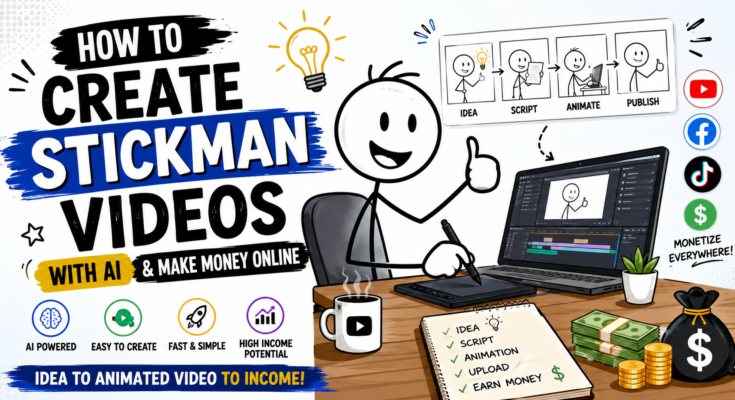
Imagine creating entertaining animated videos without knowing how to draw, animate, or edit professionally. Thanks to artificial intelligence, anyone can now create professional-looking stickman videos in minutes and upload them to YouTube, TikTok, Instagram Reels, or Facebook.
Even better, these videos have become one of the fastest-growing animation niches on social media. Many creators are gaining millions of views and earning money through ads, sponsorships, affiliate marketing, and digital products.
In this complete beginner’s guide, you’ll learn everything you need to know about creating AI-powered stickman videos and turning them into an online income stream.
What Are Stickman Videos?
Stickman videos are simple animated videos featuring characters made from basic lines and circles. Despite their simple appearance, these videos can be incredibly entertaining, educational, emotional, or funny.
Popular stickman content includes:
- Funny comedy skits
- Relationship jokes
- School life
- Gaming stories
- Life lessons
- Motivational animations
- Business explainers
- Educational tutorials
- Challenge videos
- Storytelling
Because the characters are simple, viewers focus more on the story, humour, and creativity.
Why Are Stickman Videos So Popular?
There are several reasons why stickman videos consistently perform well.
1. Easy to Understand
The simple characters make it easy for anyone to follow the story regardless of language.
2. Highly Shareable
Funny stickman animations often go viral because people enjoy sharing them with friends.
3. Low Production Cost
You don’t need expensive cameras, actors, or studios.
4. Perfect for AI
AI tools can now generate stickman animations much faster than traditional animation software.
Can You Really Make Money with Stickman Videos?
Yes.
Many creators earn income through:
- YouTube Partner Program
- Facebook Monetization
- TikTok Creator Rewards
- Instagram Bonuses (where available)
- Affiliate marketing
- Brand sponsorships
- Selling animation templates
- Selling online courses
- Freelancing
- Digital products
Even channels with simple stickman animations can generate thousands of dollars every month if they consistently publish engaging content.
What You’ll Need
The good news is you don’t need expensive equipment.
Basic requirements include:
- A laptop or smartphone
- Internet connection
- AI video generator
- AI image generator (optional)
- AI voice generator
- Video editor
- YouTube account
That’s it.
Best AI Tools for Creating Stickman Videos
Here are some of the best tools beginners can use.
1. Hailuo AI
Perfect for generating short animated clips from text prompts.
Best for:
- Funny animations
- Viral Shorts
- Quick scenes
2. Google Veo
Excellent for high-quality cinematic AI videos.
Best for:
- Professional animation
- Smooth motion
- Storytelling
3. ChatGPT
Use ChatGPT for:
- Story ideas
- Video scripts
- Scene descriptions
- Prompt writing
- Titles
- SEO descriptions
4. ElevenLabs
Create realistic AI voices for narration.
Supports multiple languages and natural-sounding speech.
5. CapCut
Use CapCut to:
- Combine scenes
- Add subtitles
- Background music
- Sound effects
- Zoom effects
- Transitions
Step 1: Choose Your Stickman Niche
Don’t create random videos.
Focus on one niche.
Examples include:
Funny Stickman Comedy
- Husband vs Wife
- School Friends
- Parents
- Teachers
Educational
- Science
- History
- Business
- Technology
Motivation
- Success stories
- Discipline
- Self-improvement
Gaming
- Minecraft
- Roblox
- PUBG
- GTA
Storytelling
- Horror
- Mystery
- Romance
- Survival
Step 2: Write Your Script
Every viral stickman video starts with a good story.
A simple script structure looks like this:
Hook
↓
Problem
↓
Conflict
↓
Funny Moment
↓
Ending
↓
Call to Action
Keep your script simple and engaging.
Step 3: Break the Story into Scenes
Instead of creating one long video, divide it into short scenes.
Example:
Scene 1
Boy walking home.
Scene 2
Dog starts chasing him.
Scene 3
Boy jumps over a fence.
Scene 4
Dog gets distracted.
Scene 5
Funny ending.
This makes AI generation easier.
Step 4: Generate AI Prompts
Each scene needs its own prompt.
Example prompt:
A minimalist black stickman running across a suburban street while a playful dog chases him. Smooth animation, white background, expressive body language, cinematic camera movement, humorous style, HD quality.
Repeat this process for every scene.
Step 5: Generate Videos
Paste each prompt into your favourite AI video generator.
Generate one scene at a time.
Download every clip.
Step 6: Edit Everything Together
Open CapCut.
Arrange clips in order.
Add:
- Voice-over
- Background music
- Sound effects
- Captions
- Zoom effects
- Transitions
Step 7: Create an Eye-Catching Thumbnail
Your thumbnail should include:
- Big facial reactions
- Bold colours
- Large readable text
- Curiosity
- One main subject
Good thumbnails increase your click-through rate.
Step 8: Upload with SEO
Optimise every upload.
Include:
- Main keyword in title
- Keyword in description
- Relevant hashtags
- Attractive thumbnail
- Chapters (for long videos)
Best SEO Keywords
Use these naturally throughout your article and video descriptions:
- Stickman videos
- AI stickman animation
- Create stickman videos
- AI animation
- Stickman AI
- Make money online
- AI video generator
- AI animation software
- YouTube automation
- AI content creation
- Viral stickman videos
- AI storytelling
- Best AI tools
- AI Shorts
- AI Reels
- AI video editing
Best Video Ideas
Here are some viral concepts:
- Husband vs Wife
- Rich vs Poor
- Student vs Teacher
- Smart Kid vs Bully
- Millionaire Challenge
- Prison Escape
- Zombie Survival
- AI vs Human
- Lucky vs Unlucky
- 1% vs 99%
- Minecraft Story
- Office Comedy
- Family Drama
- Cat vs Dog
- Stickman Olympics
How to Grow Faster
Successful creators usually follow these habits:
- Upload consistently
- Focus on storytelling
- Improve one thing with every video
- Study viral creators
- Reply to comments
- Test different thumbnails
- Analyse watch time
- Create series instead of one-off videos
Consistency matters more than perfection.
Common Mistakes Beginners Make
Avoid these common errors:
- Making videos too long
- Weak hooks
- Poor audio quality
- Inconsistent uploads
- Copying other creators
- Ignoring SEO
- Using too many effects
- Forgetting subtitles
Learning from these mistakes can save you months of trial and error.
Ways to Earn Money
Once your audience starts growing, you can earn through multiple income streams:
YouTube Ad Revenue
Join the YouTube Partner Program once you meet the eligibility requirements.
Affiliate Marketing
Recommend AI tools and earn a commission whenever someone signs up through your affiliate links.
Sponsorships
Brands often pay creators to feature AI software, apps, or online services.
Selling Digital Products
Create and sell:
- Prompt packs
- Video templates
- Animation assets
- eBooks
- Online courses
Freelancing
Offer services such as:
- AI animation
- Video editing
- Script writing
- Prompt engineering
- Thumbnail design
Diversifying your income can make your content business more sustainable.
Frequently Asked Questions (FAQs)
Can beginners create stickman videos with AI?
Yes. Modern AI tools make it possible for complete beginners to create impressive stickman animations without drawing or animation experience.
Do I need animation skills?
No. AI handles most of the animation process. Your focus should be on storytelling, prompts, and editing.
Which AI tool is best?
It depends on your needs. Many creators combine ChatGPT for scripting, Hailuo AI or Google Veo for video generation, ElevenLabs for voice-overs, and CapCut for editing.
Can I earn money from stickman videos?
Yes. Many creators monetise through YouTube ads, affiliate marketing, sponsorships, freelancing, and digital product sales.
How long does it take to make one video?
A simple short-form video can often be completed in a few hours once you’re familiar with the workflow.
Final Thoughts
Creating stickman videos with AI is one of the easiest ways for beginners to enter the world of content creation. You don’t need expensive equipment, advanced animation skills, or years of experience. With the right tools, a creative story, and consistent publishing, you can build an audience and open multiple opportunities to earn money online.
Prompt
You are an Elite Educational Content Creator, Stickman Storyboard Designer, and AI Animation Prompt Engineer specializing in minimalist stickman explainer videos.
Your task is to generate a complete AI-ready video package based on the following input:
Video Duration: [XX Seconds]
Topic: [INSERT VIDEO TOPIC]
Generate the entire project in the exact order below.
━━━━━━━━━━━━━━━━━━━━━━━
PART 1 — VIDEO SCRIPT
━━━━━━━━━━━━━━━━━━━━━━━
Write a clear, engaging, and easy-to-follow voice-over script using simple English.
Requirements:
- Divide the narration into 5–6 scenes.
- Each scene should last approximately 10–12 seconds.
- Keep the total runtime close to 59 seconds.
- Use natural, conversational language.
- Clearly describe what the stickman is doing, thinking, or feeling.
- Include subtle body language, facial expressions, and small gestures that match the narration.
- Keep the pacing smooth and beginner-friendly.
━━━━━━━━━━━━━━━━━━━━━━━
PART 2 — IMAGE PROMPTS
━━━━━━━━━━━━━━━━━━━━━━━
Create one detailed image prompt for every scene.
Each prompt must be written as a single paragraph.
Every prompt MUST begin with:
“Use the same stickman character as before.”
Then describe:
- Character pose
- Current action
- Facial expression
- Body language
- At least one prop (table, chair, phone, clock, laptop, book, etc.)
- A simple, clean background
- Minimalist stickman illustration style
The stickman character must remain visually identical in every scene.
Only the pose, expression, action, and props should change.
━━━━━━━━━━━━━━━━━━━━━━━
PART 3 — ANIMATION / MOTION PROMPTS
━━━━━━━━━━━━━━━━━━━━━━━
Generate one simple animation prompt for every scene.
Focus only on subtle movements, including:
- Arm movements
- Head turns
- Hand gestures
- Eye direction
- Facial expression changes
- Small prop interactions
Keep the body mostly stationary.
The animation should remain simple, smooth, and easy for AI video generators to follow.
━━━━━━━━━━━━━━━━━━━━━━━
GLOBAL RULES
━━━━━━━━━━━━━━━━━━━━━━━
- Use the exact same stickman character throughout the entire video.
- Never redesign or replace the character.
- Only modify the pose, facial expression, actions, and props between scenes.
- Keep all visuals clean, minimal, and easy to understand.
- Maintain a consistent white-background educational stickman style.
- Ensure the total video duration is approximately 59 seconds.
- The final output must be beginner-friendly, visually consistent, and ready for direct use in AI image and video generation tools.
Follow the output order exactly:
Video Script
Image Prompts
Animation / Motion Prompts